 |
|

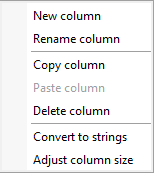
Context menu of a column
|
Action |
Description |
|
New column |
A new value column will be created at this location. |
|
Rename column |
The column name can be changed. |
|
Copy column |
All data of the column are written to clipboard. |
|
Paste column |
A copied column will be pasted at this location. |
|
Delete column |
Die selected column will be deleted. The key values column cannot be deleted. |
|
Convert to strings |
All expressions in the column will be converted to strings. |
|
Adjust column size |
The column width will be optimized. |
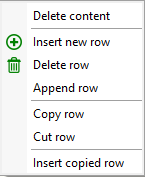
Context menu of a cell
|
Action |
Description |
|
Delete content |
The cell content will be deleted. |
|
Insert new row |
A new row will be inserted at this location. |
|
Delete row |
The whole row will be deleted. |
|
Append row |
A new row will be appended. |
|
Copy row |
The whole row is copied to clipboard. |
|
Cut row |
The whole row is copied to clipboard and deleted. |
|
Insert copied row |
The row in the clipboard will be pasted at this location. |
Note:
Entering a value in a cell may fail if no key value is entered before.
At runtime, the structure element generates a variable of type Dictionary.
See also:
 Contents
 Index
Index Previous
 Next
Next